Free TDEE Calculator
Free TDEE Calculator
Your total daily energy expenditure (TDEE) is your maintenance calories: what your body actually burns in a day. Get yours, plus your BMR and the exact calorie deficit or surplus to lose or gain weight. Calculated, not estimated. Free, accurate, and no account. Takes 30 seconds.
Your details
Watch: 30 seconds
One number is a guess. This is a calculation.
Inside easyChef Pro
Your TDEE is the start. The app turns it into a kitchen that runs itself.
The number you just calculated becomes the baseline easyChef Pro uses to score every recipe, plan every week, and build every grocery list. Every meal is measured against your specific calorie and macro targets in real time.
Calculators Built In
TDEE, daily reference intakes (DRI), macros, and protein, all inside the app and recalculated as your weight, activity, and goals change. Based on the Mifflin-St Jeor equation, USDA 2025-2030 guidelines, and NIH reference intakes. Set your number once and every meal is measured against it.
Recalculated as you changeParameters Per Recipe Score
Every recipe scored at the ingredient level using 800,000+ USDA-verified products. Calories, protein, net carbs, fiber, fat, glycemic impact, processing level, and more, calculated from real data, not estimates. So you can see if a meal fits your TDEE before you cook it.
Deterministic, not probabilisticSwap That Moves the Score Most
Every scored recipe shows the one ingredient swap that most improves it for your goal. Cutting below your TDEE? It shows the swap that lowers calories or net carbs most. Building muscle above it? It shows the swap that raises protein density. Specific and different for every recipe.
One swap. Every recipe.A 500-calorie deficit selected
Set your goal and the whole system recalibrates around your TDEE.
Say your TDEE is 2,200 and you choose to lose 1 pound a week. Your daily target drops to 1,700. Every recipe in your meal plan filters to meals that fit, your grocery list rebuilds around them, and your health scores recalculate with calorie density weighted higher. You set one number. The system reconfigured everything else.
Inside easyChef Pro
See exactly how a recipe fits your day.
Paste any recipe link. Get a 0-100 score with the full breakdown at the ingredient level: calories, protein, carbs, fat, and fiber against your target. Free. No account required.
Traffic light breakdown
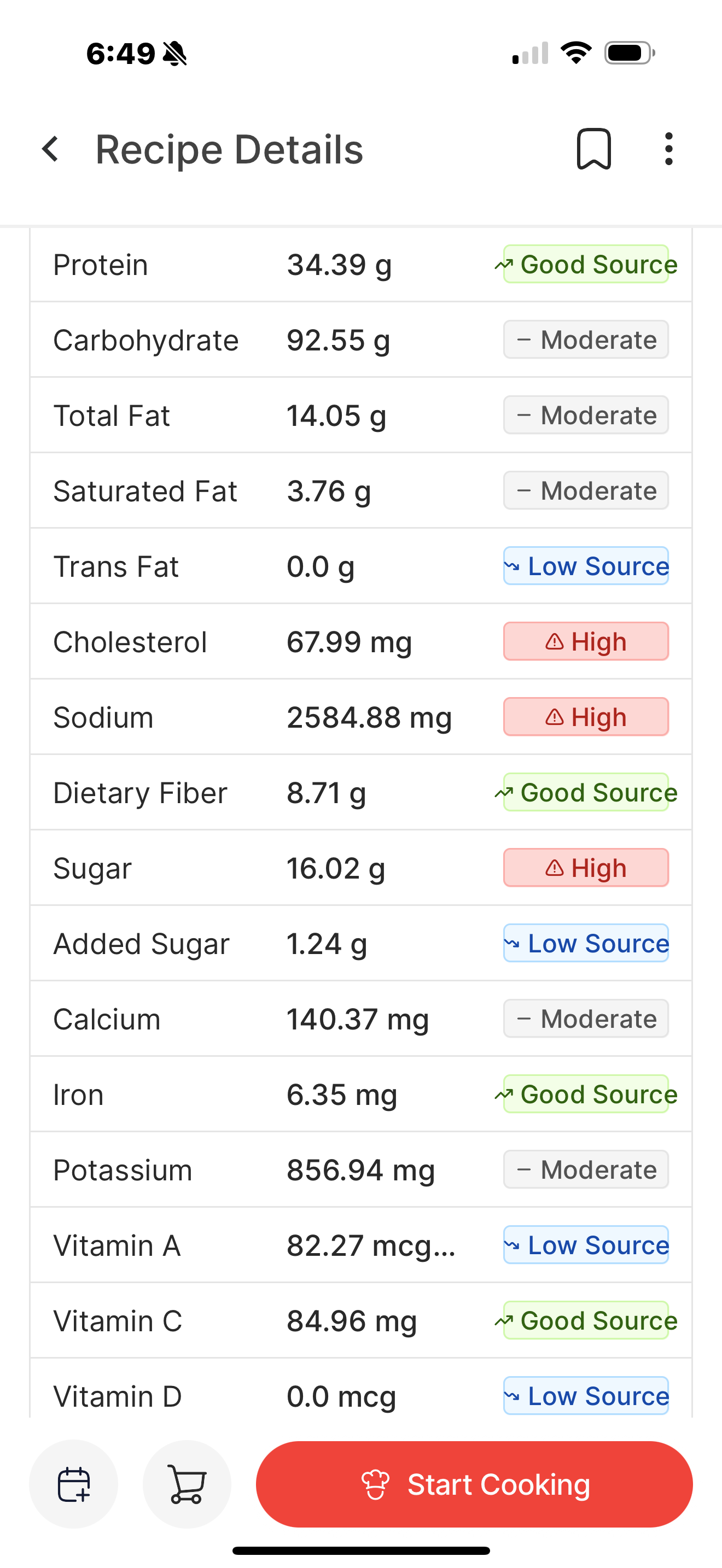
Calories and every macro labeled green, yellow, or red against your daily target.
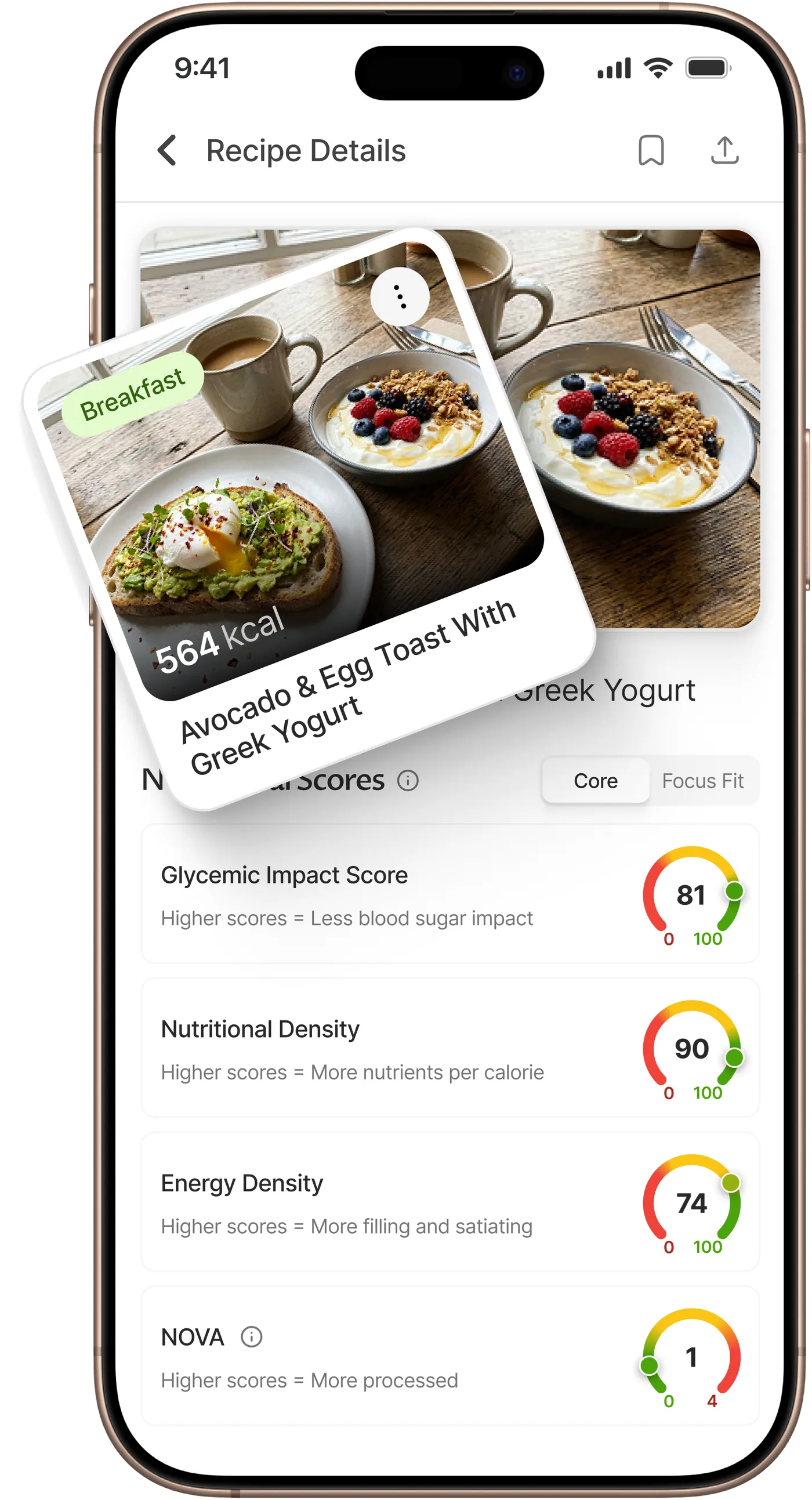
Core nutrition scores
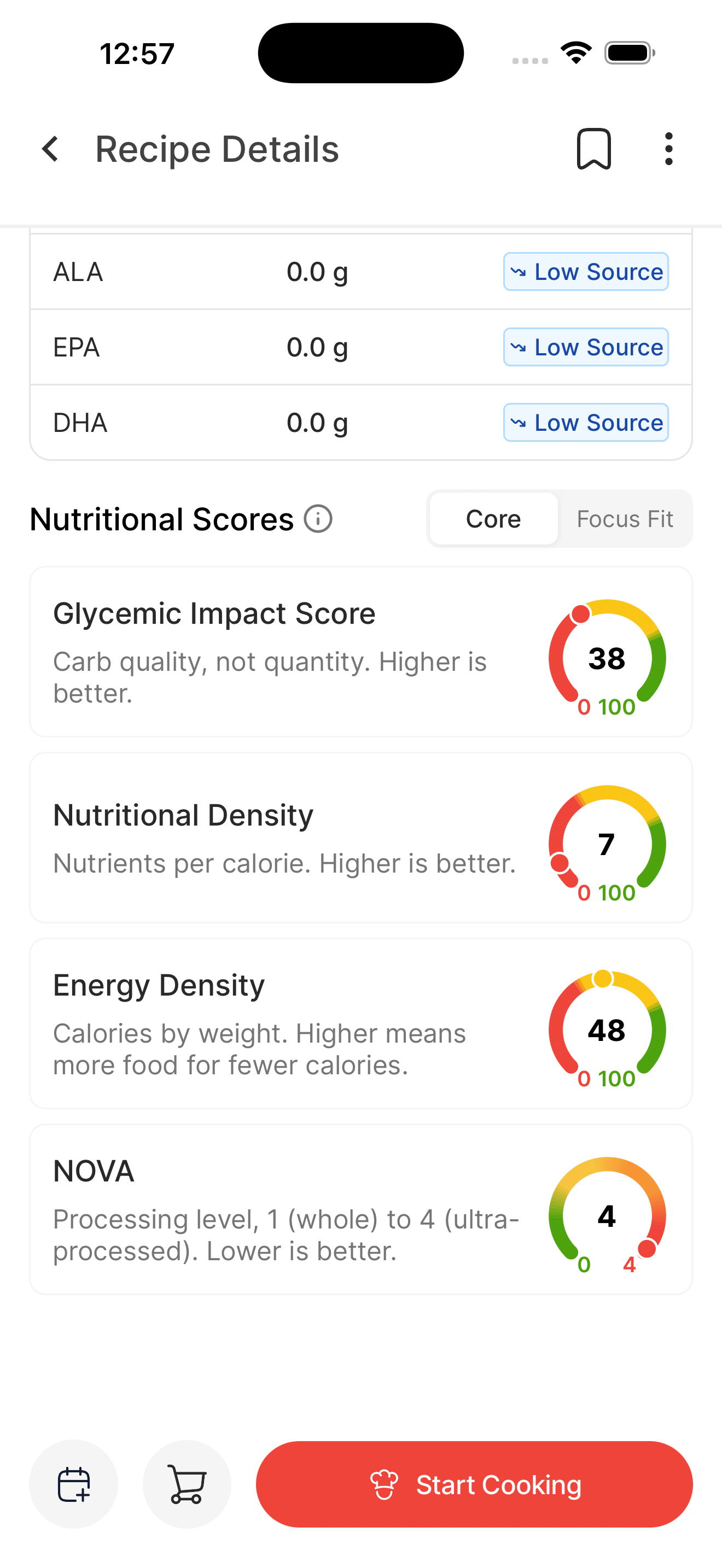
Glycemic impact, nutrient density, energy density, and NOVA processing. Four scores in one view.
Focus Fit scores
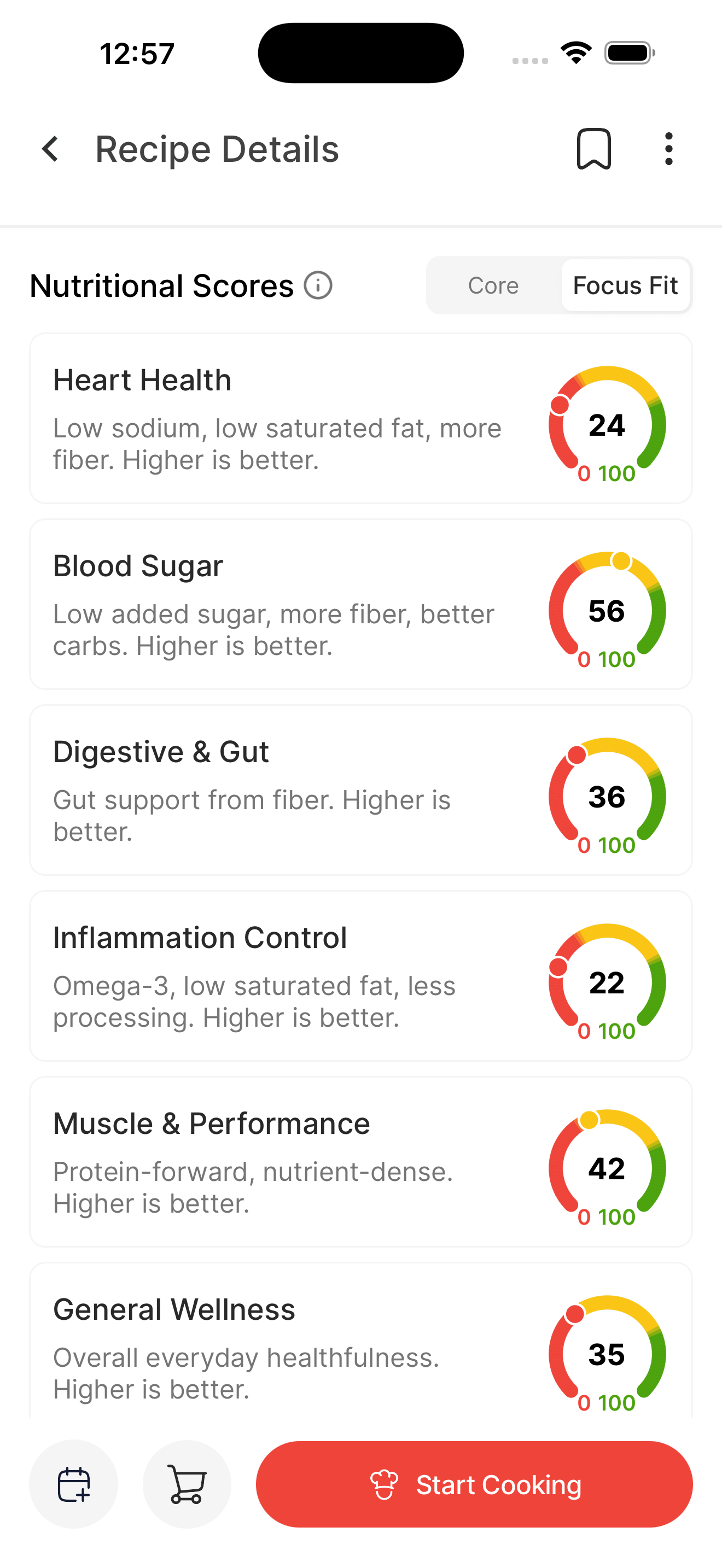
Six health dimensions. Your goal changes how every recipe scores against your TDEE.
Recipe calorie breakdown
See exactly how a recipe fits your TDEE.Before you shop. Before you cook.
Paste any recipe URL into the easyChef Pro scorer. Get the full breakdown: calories, protein, carbs, fat, and fiber per serving. Calculated at the ingredient level from USDA-verified data. Not an estimate. The actual number.
If your daily target is 1,800 calories and one dinner uses 950, you know before you commit. The scorer tells you the one swap that brings it down most, usually a single ingredient change.

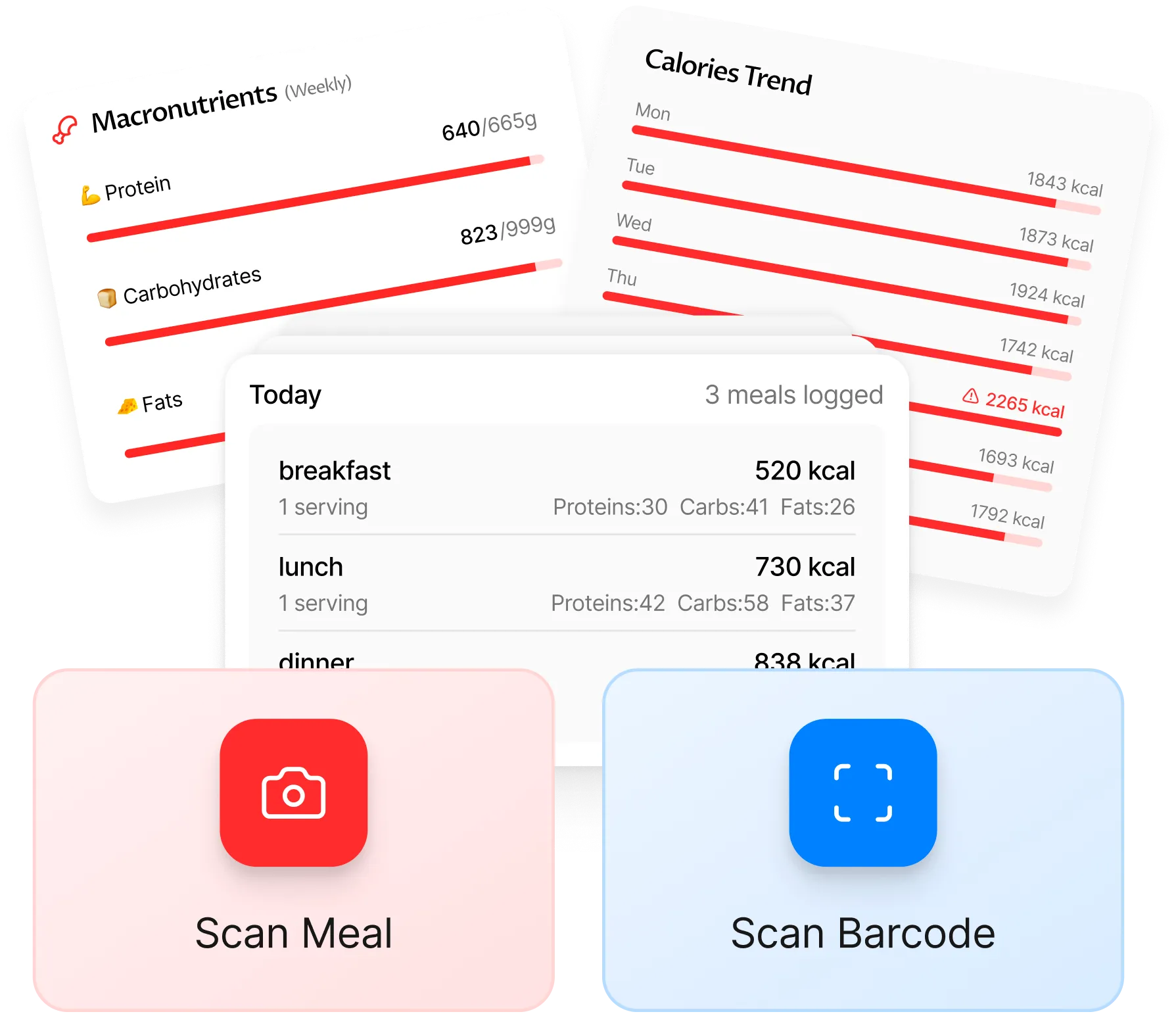
Automatic calorie tracking
Track every calorie. See the full picture.Without logging a single thing manually.
Every recipe you cook in easyChef Pro logs to your nutrition history automatically. Track daily calories against your TDEE target, see weekly trends, and see exactly which meals are keeping you on track and which are pulling you off, without entering anything by hand.
Goal-specific scoring
Your goal changes how every recipe scores.Not just filtered. Fundamentally recalculated.
Set your goal and the scoring matrix recalibrates. A cutting goal weights calorie density and protein-to-calorie ratio higher. A bulking goal weights protein and total calories. Your TDEE sets the calories; your goal sets what healthy means for you. The same stir-fry scores differently depending on what you are optimizing for.
What is TDEE?
TDEE (Total Daily Energy Expenditure) is the total number of calories you burn in a day: your body at rest plus everything you do. It is the same thing as your maintenance calories. Eat that amount and your weight stays the same. It is the one number every other calorie target is built from, which is why a free TDEE calculator is the right first step before setting a weight-loss or muscle-gain plan.
How to calculate your TDEE
TDEE is calculated in two steps. First, your BMR is found from your weight, height, age, and sex using the Mifflin-St Jeor formula, the most accurate standard equation for the general population. Then your BMR is multiplied by an activity factor, from 1.2 if you are sedentary up to 1.9 if you train hard daily. The calculator above does both and returns your maintenance calories instantly.
TDEE vs BMR
These get confused a lot. BMR is what your body burns at complete rest, just to keep you alive. TDEE is your BMR plus all the movement, exercise, and digestion on top. TDEE is always the larger number, and it is the one you eat to. Maintaining your weight means eating at your TDEE, not your BMR.
TDEE for weight loss: the calorie deficit
To lose weight, eat below your TDEE. That gap is your calorie deficit. About 500 calories below your TDEE per day is roughly 1 pound of fat loss per week; 250 below is about half a pound. To gain weight or build muscle, eat above your TDEE in a small surplus. The calculator shows all five targets next to your maintenance number, and going under 1,200 calories a day is not recommended without medical supervision.
TDEE for women vs men
The Mifflin-St Jeor formula adjusts for sex directly: at the same weight, height, and age it gives men a slightly higher BMR than women, mostly reflecting differences in average lean mass. The calculator handles this for you, so a woman and a man with otherwise identical stats will get different, correct TDEE numbers.
How accurate is a TDEE calculator?
Mifflin-St Jeor is the most accurate standard BMR formula, but every calculator is still an estimate, because metabolism varies with body composition and genetics. Treat your number as a starting point, then adjust by 100 to 200 calories after two to three weeks based on how your weight is actually trending. easyChef Pro goes a step further: instead of estimating what is on your plate, it calculates every meal from USDA-verified data, so the calories you track against your TDEE are real, not guessed.
More free tools and reading
Frequently asked questions
What is TDEE and what does it stand for?
TDEE stands for Total Daily Energy Expenditure: the total number of calories your body burns in a day, including your basal metabolic rate (BMR) plus all movement, exercise, and digestion. It is also called your maintenance calories, because eating that amount keeps your weight stable. TDEE is the single most useful number for planning weight loss or gain, because every calorie target is set relative to it.
What is TDEE in nutrition?
In nutrition, your TDEE is the calorie baseline you build your diet around. Eat at your TDEE to maintain weight, below it to lose, and above it to gain. Once you know your TDEE you can set your daily calorie target and then your macros (protein, carbs, and fat) underneath that target. It turns weight management from guesswork into a number you can plan against.
How do I calculate my TDEE?
TDEE is calculated in two steps. First your BMR is estimated from your weight, height, age, and sex using the Mifflin-St Jeor formula. Then your BMR is multiplied by an activity factor (1.2 for sedentary up to 1.9 for very active). The free calculator above does both for you and returns your maintenance calories plus your targets for losing or gaining weight.
What is my TDEE?
Your TDEE depends on your weight, height, age, sex, and activity level, so there is no single number that fits everyone. Enter your details in the calculator above and you will get your exact TDEE in seconds, along with the calorie deficit to lose weight and the surplus to gain. As a rough guide, many adults land between 1,800 and 2,800 calories per day.
What is the difference between BMR and TDEE?
BMR (Basal Metabolic Rate) is the calories your body burns at complete rest just to stay alive: breathing, circulation, organ function. TDEE is your BMR plus everything else you do in a day, from walking to working out. TDEE is always higher than BMR. You eat at your TDEE to maintain weight, not your BMR.
How many calories should I eat to lose weight?
To lose weight, eat below your TDEE: this is your calorie deficit. A deficit of about 500 calories per day equals roughly 1 pound of fat loss per week, and a 250-calorie deficit equals about 0.5 pound per week. The calculator above shows your exact deficit targets. Going below 1,200 calories per day is not recommended without medical supervision, so the calculator floors deficit targets there.
Are TDEE calculators accurate?
A TDEE calculator that uses the Mifflin-St Jeor formula is the most accurate standard estimate for the general population, validated against indirect calorimetry. Any formula is still an estimate, because metabolism varies with body composition and genetics. Use your calculated TDEE as a starting point, then adjust by 100 to 200 calories after two to three weeks based on how your weight is actually trending.